


SmartWiFi

1 Star2 Stars3 Stars4 Stars5 Stars (32 votes, average: 3.66 out of 5)
Loading ... Loading ...

SmartWiFi for BlackBerry® Wireless Handheld
SmartWiFi is the smartest way to save battery on your BlackBerry®! The revolution in battery power optimization!
Features | Screenshots | How it works Video | Supported Devices | Instant Download

Features

  • Saves battery by turning off WiFi when not needed.
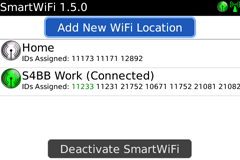
  • Remembers the WiFi locations you use.
  • Up to 100 WiFi locations can be saved!
  • Powers WiFi back on when you are back at WiFi coverage.
  • Saves battery by avoiding your device to constantly check for available WiFi hotspots.
  • Displays useful information: BSSID, SSID, Data Rate, Radio Band and Signal Level.
  • Supported mobile devices: GSM / GPRS, CDMA and iDEN. (BlackBerry® must be WiFi enabled)


How it works

SmartWiFi leverages from the BlackBerry® always being connected to the network carrier. By combining cell tower and WiFi hotspot information WiFi is turned off when not needed and turned back on when needed. Because WiFi is one of the biggest consumers of battery power (when searching for WiFi networks) this has a tremendous effect on your battery life.

How SmartWiFi Saves Battery

By remembering cell tower information, SmartWiFi detects when you leave your hotspot area (e.g. home or office) and WiFi is turned off automatically. From now on you save a lot of battery power!

How to Get Connected again

SmartWiFi detects when you come back to a hotspot area (e.g. home or office) based on the network carrier’s cell tower information. WiFi can be used as usual.

Screenshots

SmartWifi for BlackBerry - The smartest way to save battery power SmartWifi for BlackBerry - The smartest way to save battery power

SmartWiFi in Plain English

Documentation Download: Quick Guide

Supported Devices

All WiFi-capable BlackBerry® devices are supported.

Get SmartWiFi
     

Palm and/or Treo are trademarks owned by or licensed to Palm, Inc. The RIM, BlackBerry and SureType families of related marks, images and symbols are the exclusive properties and trademarks of Research In Motion Limited. More information on legal issues can be found here.
Close
E-mail It