


Menu Clock

8 votes, average: 4.50 out of 58 votes, average: 4.50 out of 58 votes, average: 4.50 out of 58 votes, average: 4.50 out of 58 votes, average: 4.50 out of 5 (8 votes, average: 4.50 out of 5, rated)
Loading ... Loading ...


Menu Clock


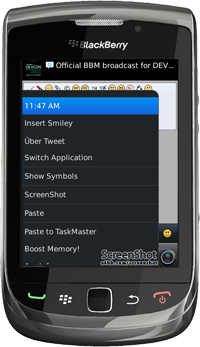
Menu Clock is the next generation time and date clock for your BlackBerry® menu.

Features | Screenshots | Supported Devices | Purchase (Download)

Key Features

  • Application screen updates in realtime
  • Data shown in menu can be set to: time only, time & date, or date only
  • Menu click action can now be set to: show time & date dialog, BlackBerry® clock, or Menu Clock screen
  • Time & Date dialog now updates in real time
  • Fully integrated with BlackBerry® OS
  • Enhances workflow


Screenshots – Home Screen, In Twitter & In Facebook

Menu Clock for BlackBerry Device Menu Clock for BlackBerry Device Menu Clock for BlackBerry Device

Having to check the time when you’re talking on BBM, playing a game or going through email can be rather annoying. Switch back to the home screen, check the time and switch back to the application again you’re using. We at S4BB thought that there had to be an easier way to check the date and time without closing the application your using; Menu Clock! This light weight app shows the time and/or date (depending on your preferences) within any native or third party application. Checking the time and date on your BlackBerry® has never been that easy!


Supported BlackBerry® devices:

All BlackBerry® devices running OS 5.0 or higher.

Get TaskReports
     

Palm and/or Treo are trademarks owned by or licensed to Palm, Inc. The RIM, BlackBerry and SureType families of related marks, images and symbols are the exclusive properties and trademarks of Research In Motion Limited. More information on legal issues can be found here.
Close
E-mail It